Go when the bite is best,
sea, river or reservoir
Tides, swell, wind and river flow hour by hour, with a score for every way of fishing.

- No account
- No ads
- No tracking
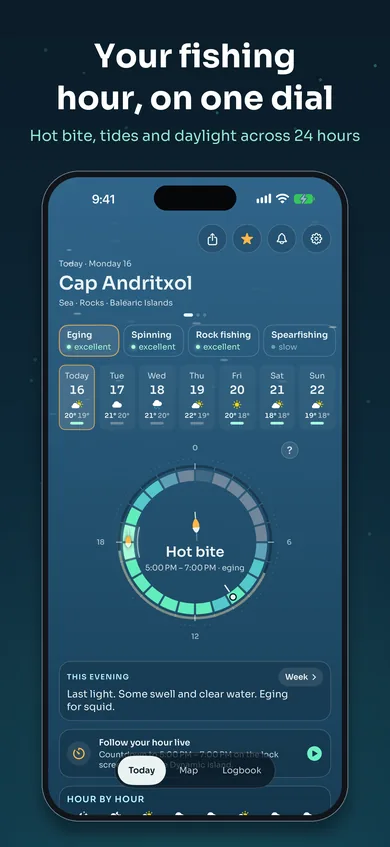
Drag along the dial to read any hour
The score
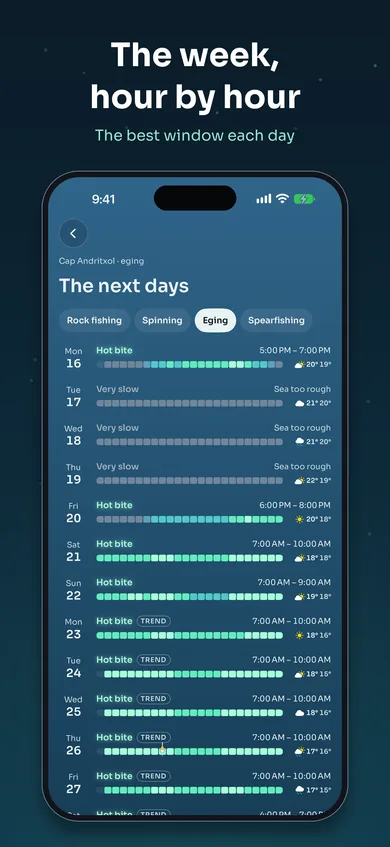
Every hour gets a number, and a sentence.
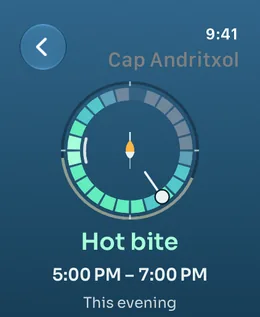
Fishers Hour scores each hour from 0 to 100 for the way you fish, from waves, wind, tide, water temperature and clarity, river flow and reservoir levels. Then it says it in words, with the best window of the day marked on a 24-hour dial.
- Five levels, from very slow to hot, on one colour scale: brighter is better.
- When there is no good window, it tells you why: big sea, strong wind, a river in flood or cold water.
- The score is worked out by a data pipeline; the app shows it, groups it into windows and, with Pro, learns from your own ratings (up to 10 points either way).
- Very slow
- Slow bite
- Fair bite
- Good bite
- Hot bite
Your way of fishing
Nine ways, each with its own score.
The same hour is not the same for a surfcaster and for a kayaker. Each mode weighs the conditions its own way, and the app sorts them for the spot you are looking at.
At sea
In fresh water
Sea, rivers and reservoirs
One map from the Atlantic to the Mediterranean.
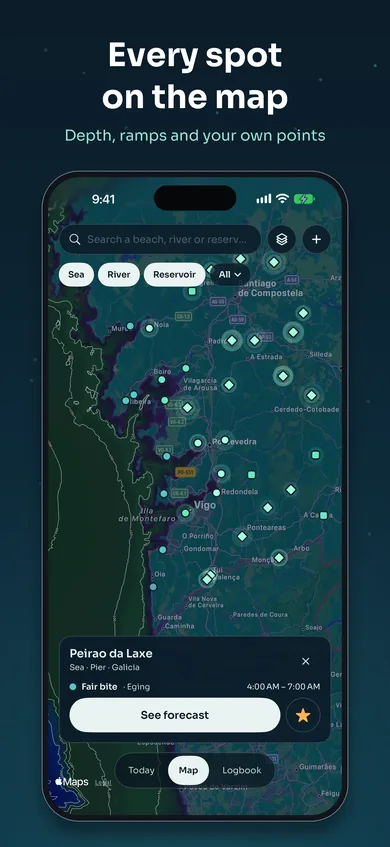
More than 13,000 fishing spots across Spain, Portugal, France and Atlantic Morocco: beaches, piers, rocks, estuaries, rivers and reservoirs. Search by name or just open the map.
- River flow with a 30-day forecast, and reservoir levels (Pro).
- Water temperature, wind, waves, sky and rain for the days your plan shows.
- Works offline with what it last downloaded.
Tides
Tides computed on your phone.
High and low water, the tide coefficient, sun and moon, calculated on the device from the EOT20 harmonic constants, so they work with no signal. The calendar runs 3 days free and up to 3 months with Pro.
- Spring and neap tides marked on the calendar.
- Sunrise, sunset and moon phase beside every day.
- Tides are not for navigation.
Tide coefficient and moon, next days
Depth and ramps
Read the bottom before you go.
A depth layer shows the sea floor and the isobaths from EMODnet Bathymetry (Pro), and every spot says its approximate depth and how far the 10 m line is. A free layer shows boat ramps from OpenStreetMap. Not for navigation.
- Depth shading and contour lines on the map.
- Boat ramps and slipways, free.
- Depth at the spot: "around 11 m, 10 m line at 120 m".
My points
Your rocks, your drop-offs, your parking.
Press and hold the map to mark a point with an icon and a note. Near the water, each point uses the forecast of the closest spot. Bring yours from Garmin, Navionics or Google My Maps, and take them out again whenever you like.
- Import GPX, KML and KMZ; export GPX.
- 5 points free, unlimited with Pro. Nothing is ever deleted.
- Only you see them; they sync through your own iCloud.
Species guide
29 species, each with its own guide.
From sea bass and bream to trout and black bass: how to recognise each one, where and when to find it, how to fish it, baits and a tip. The names are in all seven languages and the search finds them in any of them.
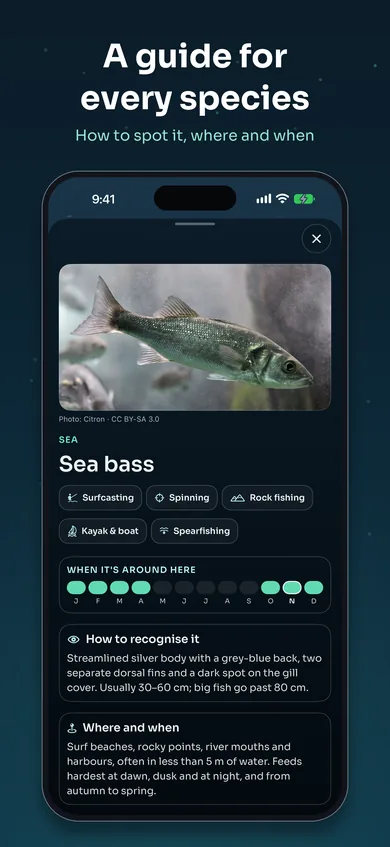
The full guide is part of Pro.
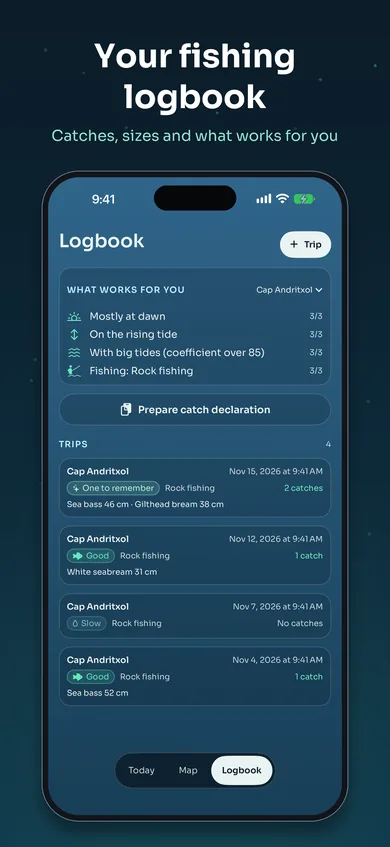
Logbook
Your days on the water, kept.
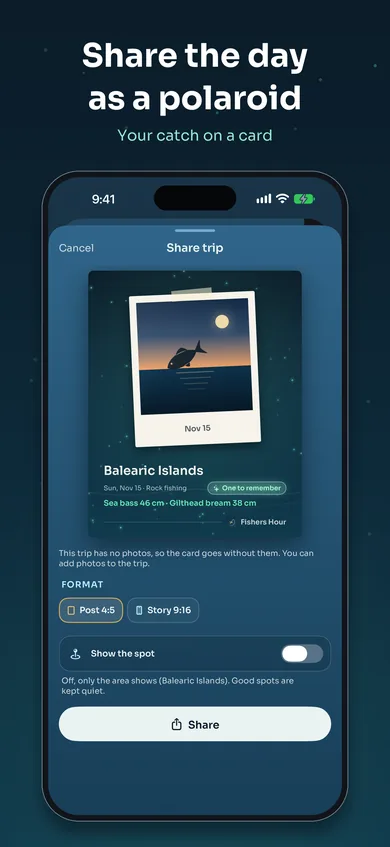
Log trips, catches and photos, rate the day, and share it as a polaroid. With Pro, "What works for you" reads your own logbook, and the score learns from your ratings.
- Photos are stored without GPS or camera data.
- Share a trip or a forecast card; the spot's name stays hidden unless you show it.
- A summary ready for your catch declaration (Pro).
Safety and rules
Warnings that are never hidden.
Waves breaking on rocks, dangerous wind for kayaks, poor visibility for spearfishing, rivers in flood, thunderstorms and gales: the warning is always visible. Storm and gale alerts are free. Rules are only linked from the official source of your region, never summarised.
- Always check the regulations in force.
- Links to the official catch-reporting apps.
- A forecast, not legal advice.
Alerts and widgets
It tells you before you have to ask.
Pro alerts the evening before at the hour you choose, or an hour before the window. Widgets for the home and lock screens, and a Live Activity that counts down to your window.
- Widgets: small is free, medium and lock screen are Pro.
- Live Activity on the lock screen and Dynamic Island.
- Everything runs on your device: no server sends you anything.
Apple Watch
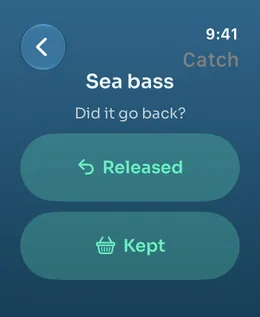
Log a catch without taking your gloves off.
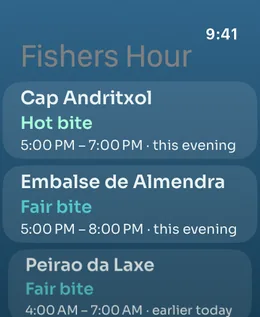
Favourites with level and window on your wrist, complications for the watch face, and a quick way to log a catch that lands in your logbook. Pro.
- Complications: circular, rectangular, corner and inline.
- Species of the water you are fishing, in season first.
- Optional fishing session saved to Health.
iPad and iCloud
On every screen, on every device.
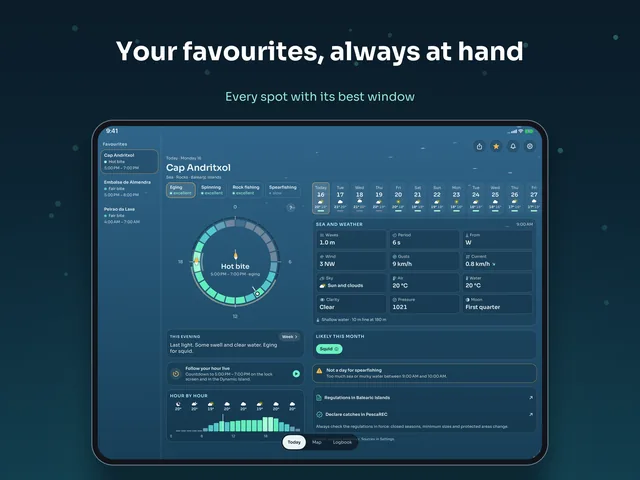
On iPad the favourites rail, the dial and the detail sit side by side. Logbook, points, favourites and settings follow you across your devices through your own private iCloud: we have no account and see none of it.
- Built for iPhone and iPad.
- Sync through your own iCloud, nothing of ours in between.
- Seven languages: English, Spanish, Catalan, Basque, Galician, Portuguese and French.
Free and Pro
Free for real. Pro if you want more.
Free has no ads and no account. Pro adds depth, and the trial is 7 days: we remind you 2 days before you are charged, and you cancel from Settings in one tap.
Free
- Today and the next 2 days
- The whole map of fishing spots
- 5 points of your own and 5 trips in the logbook
- Storm and gale warnings
- A 3-day tide calendar
Fishers Hour Pro
- 14-day forecast
- Unlimited points and trips
- 3 months of tides and the depth layer
- River flow with a 30-day forecast and reservoir levels
- Alerts, widgets, Live Activity and Apple Watch
7-day free trial on the yearly plan
Privacy
No account. No ads. No tracking.
Your logbook, points and photos stay on your device and in your own iCloud. The App Store privacy label is "Data Not Collected".
Questions
Quick answers
How is the score worked out?
Every hour gets a score from 0 to 100 for each fishing mode, from waves, wind, tide, water temperature, river flow and reservoir levels. A separate data process calculates it; the app shows it, groups it into windows and explains it in one sentence. With Pro, your trip ratings can nudge it by up to 10 points either way.
Why is the forecast for my spot missing?
Check your connection first: data is downloaded and kept for offline use. If the spot is new or in a recently added area it can take a little while. If it still doesn't show, write to us with the spot's name.
How do I cancel the free trial?
In the app: Settings › Manage subscription. Or on your iPhone: Settings › your name › Subscriptions › Fishers Hour Pro › Cancel. Cancel at least 24 hours before the trial ends to avoid being charged. We remind you 2 days before. On Android: Google Play › Payments & subscriptions › Subscriptions › Fishers Hour Pro › Cancel subscription, also at least 24 hours before the trial ends.
How do I restore my purchases?
Settings › Restore purchases, with the same Apple account you bought with. It is also on the Pro screen. On Android, Settings › Restore purchases uses the Google Play account you bought with.
How does iCloud sync work?
The logbook, photos, My points and alerts, plus favourites and settings, travel through your private iCloud between your devices signed in with the same Apple account. You need iCloud turned on. We see none of it. Android has no such sync: the data stays on the device.
What about fishing regulations?
Fishers Hour only links to the official regulations for your area and does not list sizes, quotas or closed seasons. Always check the regulations in force before you go.
Get Fishers Hour
For iPhone, iPad and Apple Watch.